NEW  ·  MEET VEDA, YOUR VOICE ASSISTANT

Every morning, your family's day — already thought through

Smart scheduling, personalized meal planning, and a morning briefing for every person in your family — now with Veda, a voice assistant that manages your schedule, tasks, and grocery list mostly hands-free. Share one invite code, and every day starts a little lighter.

You're on the list! ✦

We'll send product updates and release notes.

Free to start · No credit card · Now available on the iOS App Store

One invite code for anyone
30-second family setup
No ads · No data selling

The daily juggle is exhausting. SparkDay makes it lighter.

Most family apps just put calendars and grocery lists in one place. SparkDay actually does the thinking — so mornings stop feeling like a sprint.

🤯

Too many apps, too many taps

Calendars here, meal plans there, grocery lists somewhere else. SparkDay connects them so nothing falls through the cracks.

Mornings that start in chaos

"What's happening today?" shouldn't require five texts and a browser. Everyone wakes up already knowing the plan.

🛡️

Everyone gets the view they need

Shared family events stay in sync. Personal things stay personal. No ads, no tracking, and teens can join without giving up an email.

SparkDay is built so every family member can move faster together — whether it's you and a partner, grandparents helping out, or the whole household.

New · Voice assistant

Meet Veda. Just talk — it's handled.

Veda is SparkDay's new voice assistant. Manage your schedule, tasks, and grocery list mostly hands-free — tap the petal button on the Home screen, and talk away.

"Add soccer practice Tuesday at 5"
"What's on my schedule tomorrow?"
"Remind me to sign the permission slip tonight"
"Add milk, eggs, and bananas to the grocery list"

Private by design — Veda conversations are never logged.

Veda
SparkDay voice assistant
Add soccer practice Tuesday at 5.
Done — Soccer practice is on the calendar for Tuesday at 5:00 PM. Want a reminder before pickup?
Yes. And add milk and eggs to the grocery list.
Reminder set ✦ Milk and eggs are on the list. Anything else while your hands are full?
Listening…
Scan to events

Snap a school flyer. 30 events, scheduled.

Type it, say it, or scan it — SparkDay turns paper calendars, PDFs, and screenshots into real calendar events. The whole school year, on your family's calendar, in under a minute.

1
Snap or drop

Photograph the flyer on the fridge, drop in a PDF, or share a screenshot from an email.

2
SparkDay reads every date

Dates, times, and locations are detected automatically — even from busy, cluttered layouts.

3
Review, then add all at once

One tap puts every event on the family calendar. No more typing them in one by one.

Works with photos, PDFs, screenshots, and shared emails.

Lincoln Elementary

Fall Activity Calendar

Sep 12Back-to-School Night · 6:00 PM
Sep 18Picture Day · 8:30 AM
Sep 25PTA Meeting · 7:00 PM
Oct 2Field Trip · Science Museum
Oct 9Early Release · 1:15 PM

…and 25 more dates

✦ Scan to events 30 events found
Back-to-School Night
Thu, Sep 12 · 6:00 PM · School Gym
Picture Day
Wed, Sep 18 · 8:30 AM
PTA Meeting
Wed, Sep 25 · 7:00 PM · Library
Field Trip — Science Museum
Wed, Oct 2 · Permission slip needed
Early Release Day
Wed, Oct 9 · 1:15 PM pickup

Snapped, reviewed & scheduled in under a minute

1 snap
One photo of the flyer
30 events
Detected in a single pass
< 1 min
From fridge door to family calendar

Everything families need to plan fast, share clearly, and stay ahead.

SparkDay is built for real family velocity: fewer taps, clearer mornings, and less daily chaos.

From paper calendars to fully scheduled in minutes.

Snap a photo or upload a document, review smart-detected events, then add in bulk. SparkDay is designed for parents who need to move fast without losing details.

30s → 30 events
Scan and parse an entire school or activity schedule in one pass, then confirm and save.
Built for busy family setup nights

01 One calendar, synced

Your whole family's schedule — synced with Google & Apple.

Connect your existing calendars so every event lives in one place, with no double-entry. SparkDay even factors in travel and location, so you get a nudge before you need to leave — not after.
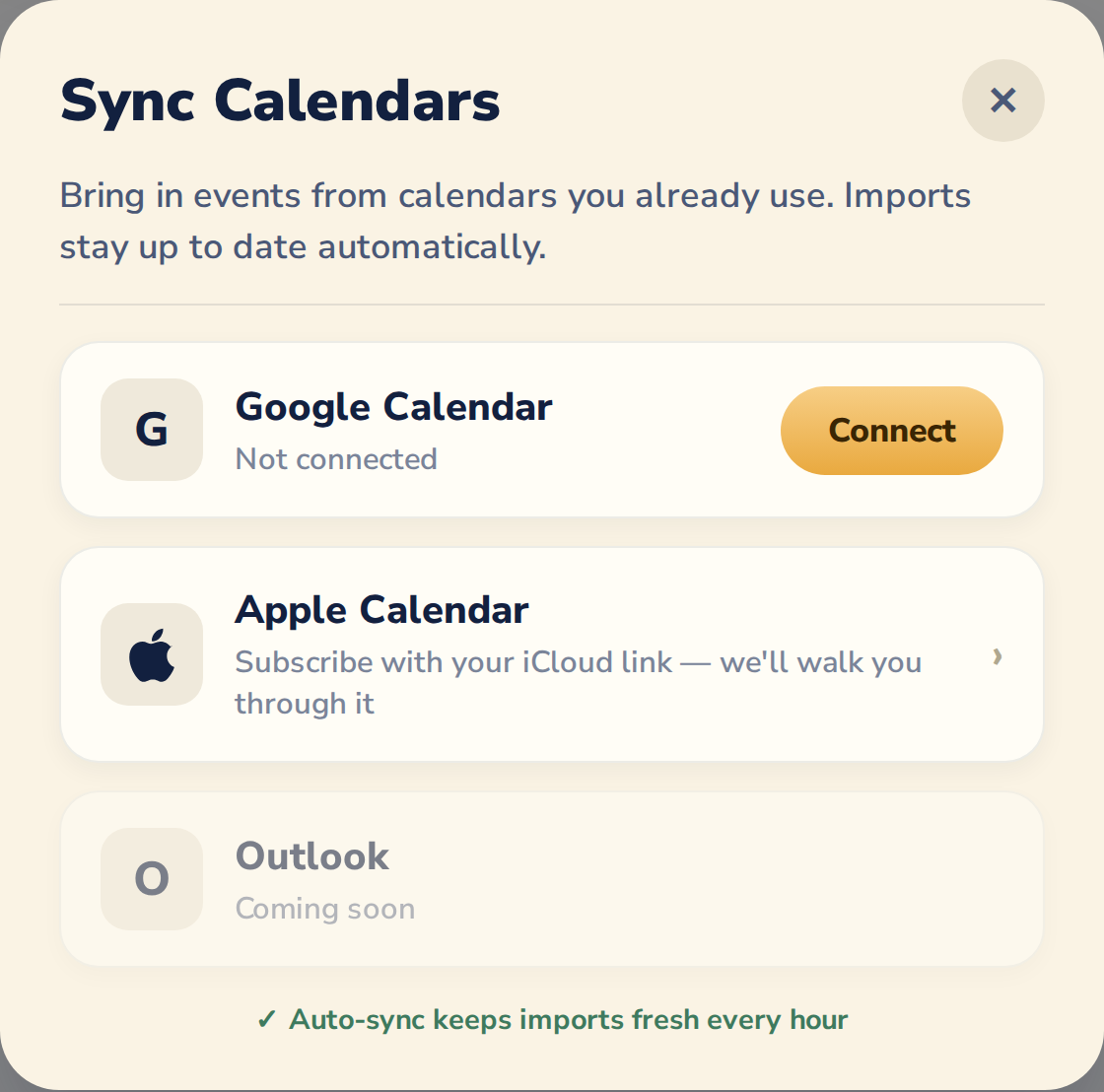
Sync Calendars screen showing Google Calendar connect, Apple Calendar via iCloud link, and hourly auto-sync

02 Family sharing

One shared timeline that keeps everyone synchronized.

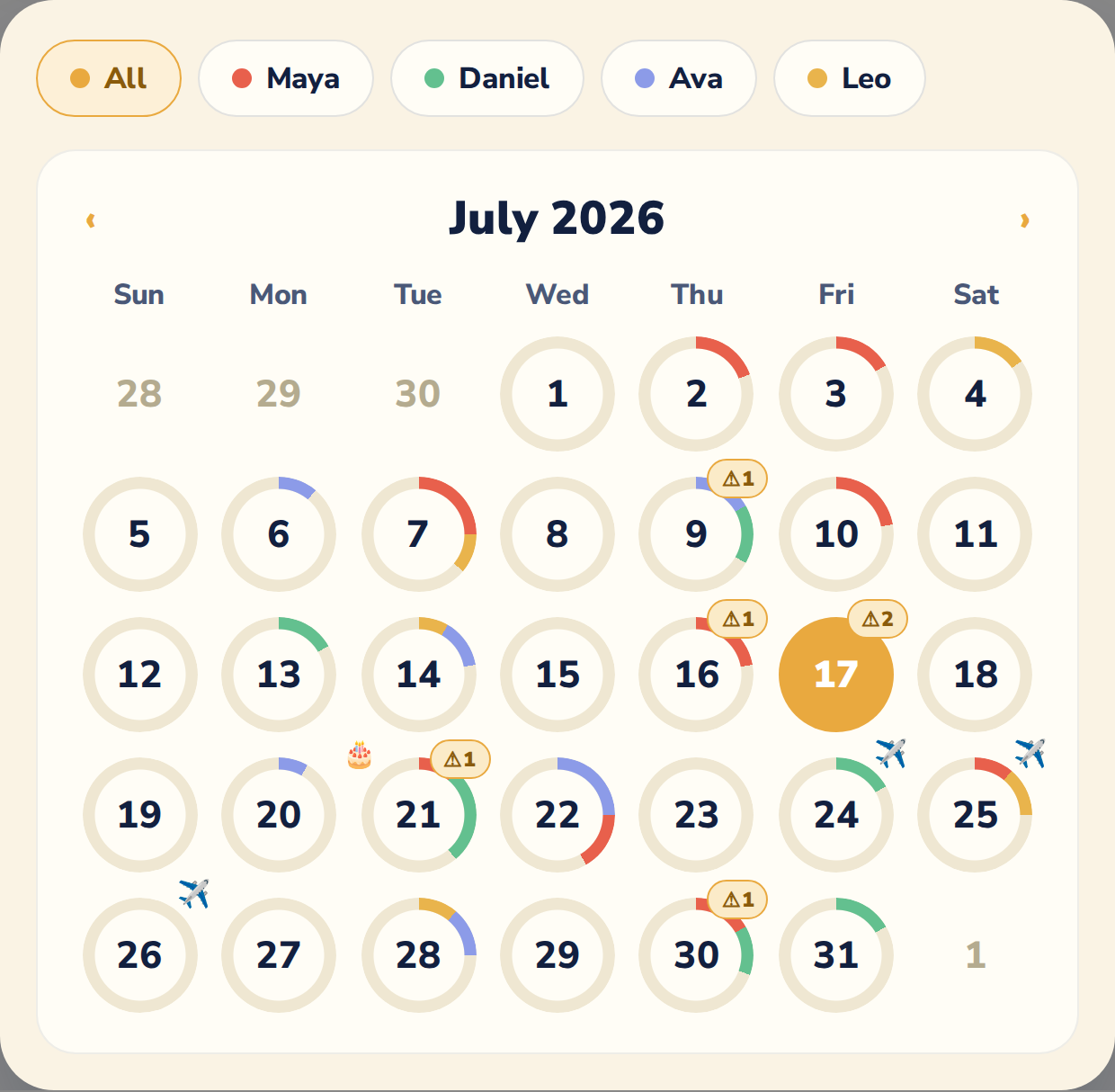
Everyone on the invite code sees one shared timeline for family events, while personal events stay private unless shared. No more texting "what time is pickup?".

Month calendar with color-coded activity rings per family member, clash badges, birthdays, and travel days

03 Veda voice assistant — new

Schedule, tasks, and groceries — mostly hands-free with Veda.

Tap the petal button on the Home screen and just talk: "Maya soccer Tue Thu 4:30." Veda parses the recurrence, time, and assignment automatically — and handles your tasks and grocery list too. See Veda in action ↑

Veda is listening…
Tue · Thu4:30 PMMaya

04 Scan to calendar

Turn any schedule document into calendar events in seconds.

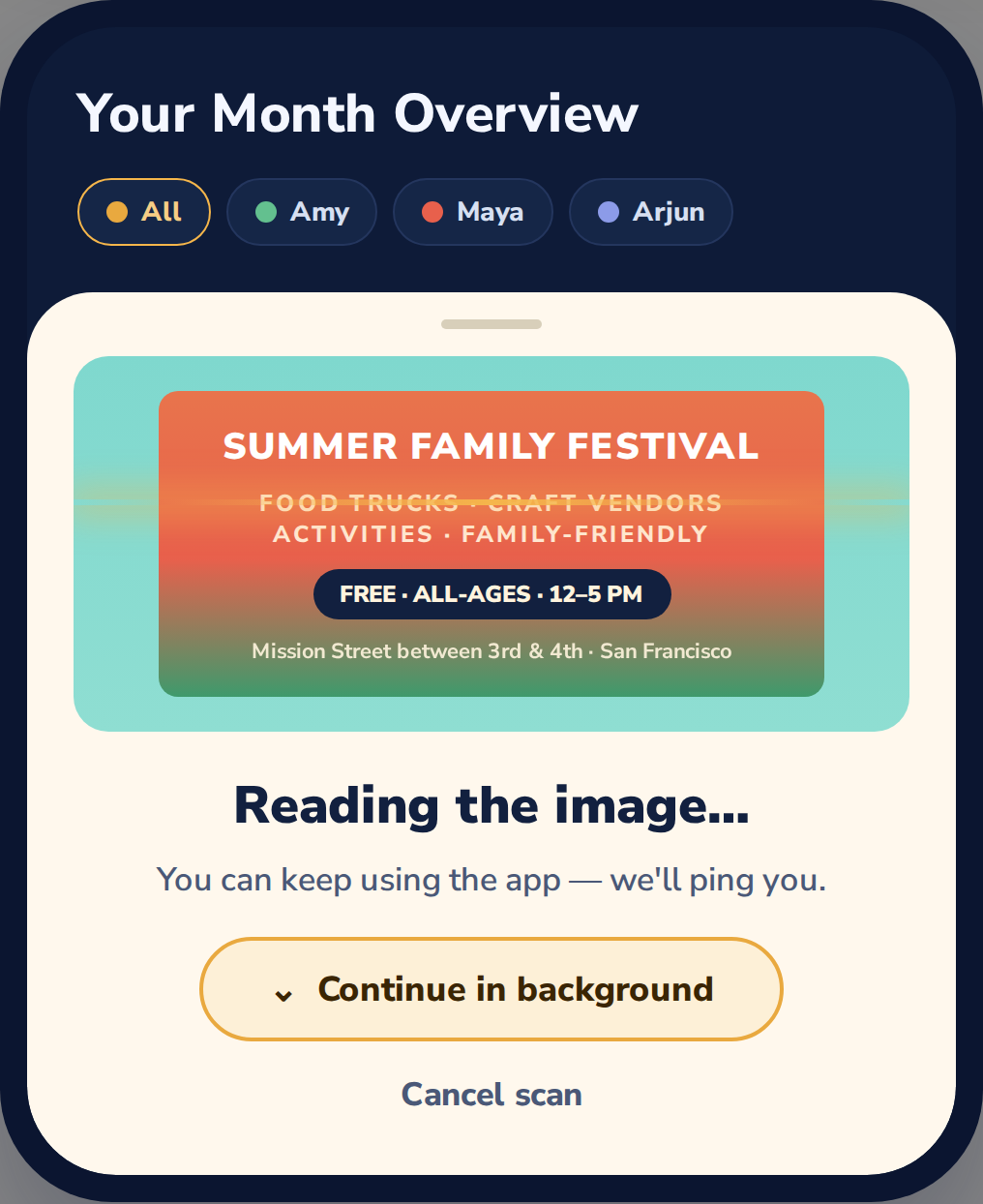
Snap a photo of a school flyer, drop in a PDF, or share a screenshot from an email. SparkDay reads the dates, times, and locations, then lets you review and add them all at once — perfect for back-to-school nights and activity sign-ups. See it in action ↑

Scan in progress: a family festival flyer being read, with the option to continue in the background

05 Smart meals + grocery

Meal planning that adapts to your actual week.

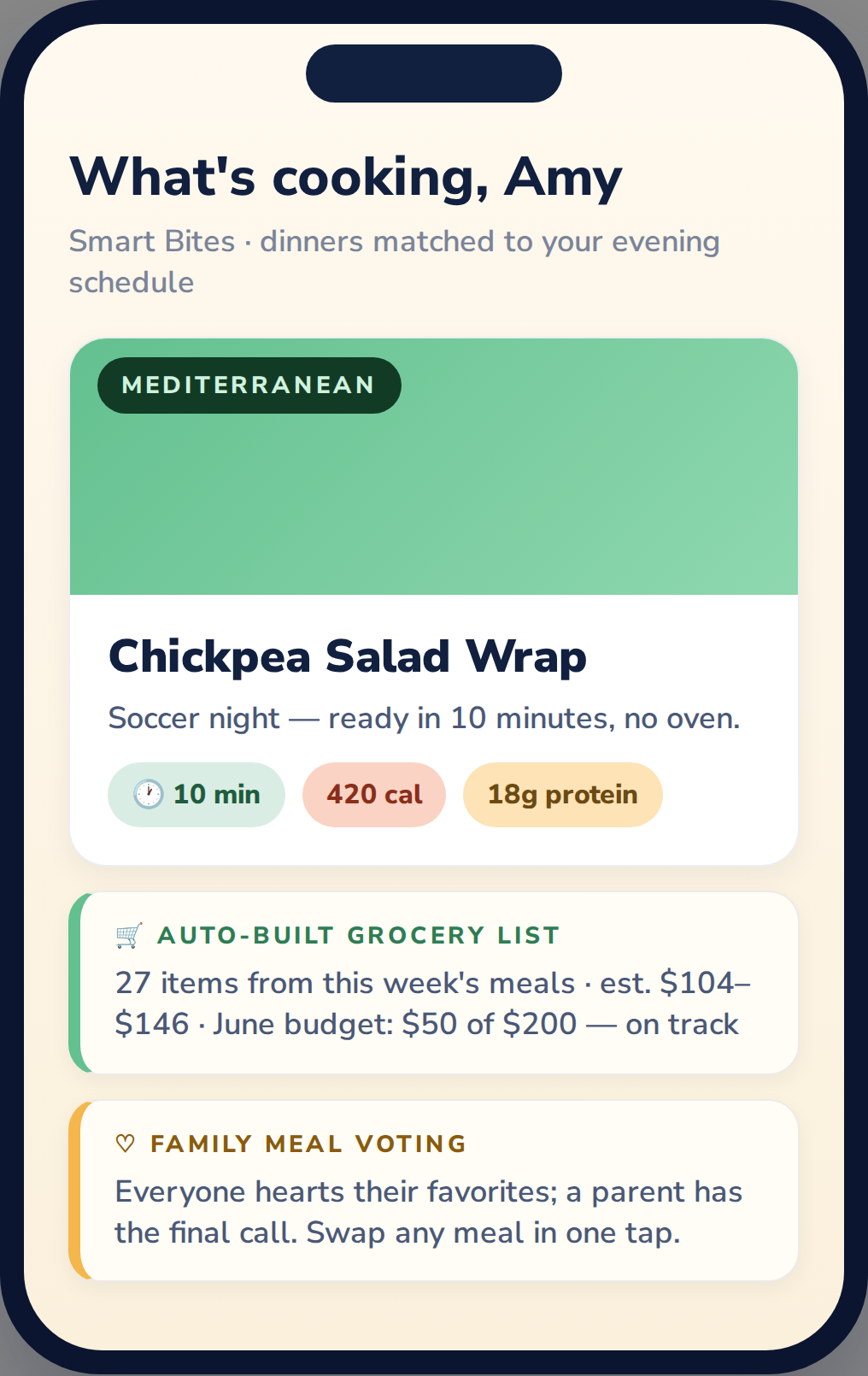
Meal plans adapt to your week's intensity and household staples, then generate grocery lists that are practical, grouped, and easy to shop.

Smart Bites meal screen with a 10-minute dinner matched to soccer night, auto-built grocery list with budget, and family meal voting

Morning Spark ✦

Every morning, each family member gets a personalized briefing. Same family data, completely different voice — a logistics captain for the planner, a supportive coach for the teen heading into a test, a gentle heads-up for a grandparent on pickup duty.

  • Synthesizes calendar, weather, meals, and activities
  • Tone adapts to each family member's role and age
  • Outfit suggestions based on the day's weather
  • Delivered as a card at 7am, or whenever you choose

Good morning, Maya!

You've got a math test first thing — deep breaths, you're ready. Quiet afternoon, then soccer at 4:30. Don't forget your cleats, it's chilly out there.

School drop-off — 8:15 sharp
Soccer practice pickup at 4:30
47°F, clear — grab a hoodie
Taco bowls for dinner (25 min)

✦ Your whole day, already thought through. Go have a great one.

However your family is built — SparkDay fits.

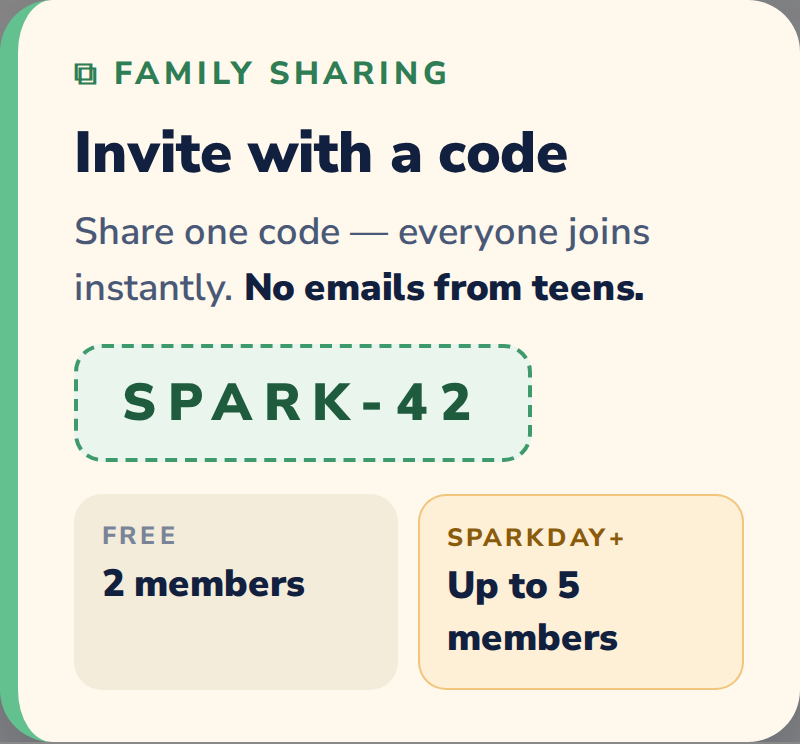
Share one invite code with anyone who helps run your household. Two parents, a single parent and a grandparent, co-parents across two homes, a nanny, a partner, or teens. Everyone gets a view tuned to their role.

Family sharing invite card: share code SPARK-42, 2 members free, up to 5 members with SparkDay+

For the planner Command center

  • Ask Veda — add events, tasks, and groceries by voice, hands-free
  • See every family member's shared events in one view
  • Weekly dinner plans matched to your schedule's intensity
  • Auto-generated grocery lists from your meal plan
  • Morning briefing surfaces what needs your attention today
  • Invite anyone with a simple code — no email needed
  • Week Ahead summary every Sunday to prep for the week

For everyone else Private + personal

  • Join with a nickname + PIN — no email, no setup hassle
  • Personal events stay private, shared events stay in sync
  • Morning Spark in a voice that fits — coach, partner, or helper
  • Talk to Veda instead of typing — perfect between classes or errands
  • Meals and snacks timed to your own activities and schedule
  • Pick your own theme — Ocean, Berry, Royal, Sunset
  • Works whether it's a teen, grandparent, nanny, or partner

Families with tweens and teens get a few bonus features — extra privacy controls and coach-voice briefings designed with teens in mind — but the core SparkDay experience works for any family structure.

From chaos to a calm routine in under 5 minutes.

No long onboarding. No manual data entry. Just sign in, scan, invite, and start every day ahead.

1

Sign up in 30s

Use Google or Apple. No forms, no credit card.

2

Scan it — or say it

Photo, PDF, or just tell Veda. SparkDay extracts the events automatically.

3

Invite your family

Share a code. Teens join with nickname + PIN — no email.

4

Wake up to Morning Spark

Your whole day, synthesized, 7am sharp.

Your family's data stays yours.

Privacy isn't an afterthought — it's the architecture. Everyone in your family gets the same protections, with extra safeguards for teens who join without an email.

Email optional for invited members

Anyone joining by invite code can sign up with just a nickname. No email, no phone, no birthdate required — especially important for teens.

No ads. No tracking.

No ads, no third-party analytics on minor accounts, and no data selling. Ever.

Parents control access

Parents can view, manage, and permanently delete any family member's account at any time. Full control, always.

COPPA-minded

Our invite-code system and minimal data collection are designed with children's privacy regulations in mind.

We built SparkDay because the mental load of running a family is real — whatever your family looks like. The planner in the household needs a command center that saves real time. Everyone else needs a view that respects them and actually helps, not another place to be monitored. SparkDay is the answer we wanted for our own families.
The SparkDay team · Parents first, builders second

One plan for the whole family.

Start free. Upgrade when your family wants the full experience. No per-person charges, no hidden fees.

Monthly Annual Save 30%

Free

$0 forever

For individuals and couples getting organized.

  • Family calendar (2 members)
  • Text + voice event input
  • Daily summary
  • Basic weather
  • Schedule reminders
  • Tasks — notes and loops
  • Chore board — add, assign, take, finish
  • Practice routines + session logging
  • Grocery list + staples
  • Saved recipes
  • Default theme
  • Family points, stickers and the weekly race
  • Rewards to spend points on
  • Personal development
  • Morning Spark AI briefings
  • Smart Bites meal planning
  • Photo scan to schedule
  • Smart Insights + conflicts
  • All themes
Download on App Store

Questions parents keep asking.

Straight answers about privacy, pricing, and how SparkDay actually works.

What is Veda and how do I use it?
Veda is SparkDay's new built-in voice assistant. Tap the Voice AI button on the Home screen and talk naturally — "Add soccer practice Tuesday at 5", "What's on my schedule tomorrow?", or "Add milk and eggs to the grocery list". Veda manages your schedule, tasks, and grocery list mostly hands-free, and your conversations are never logged.
Where can I download SparkDay?
SparkDay is now available on iOS via the App Store.
How much does SparkDay cost?
SparkDay has a real free tier for up to 2 family members. SparkDay+ is $4.99/month or $44.99/year for up to 5 members, with Morning Spark AI, Smart Bites, photo scan, and all themes included.
Does every family member need their own email to join?
No. Anyone invited with a SparkDay code can join with just a nickname and a PIN — a partner, grandparent, nanny, or teen. It means anyone can participate without you having to set up a new email account for them. Teens especially benefit from this, since we never collect their email, phone number, or birthdate.
Does SparkDay sync with Google Calendar or Apple Calendar?
Yes. You can sync family events to your existing calendar apps so everything stays in one place, while keeping teen-private events inside SparkDay.
How does the meal planning actually work?
SparkDay reads your week's schedule and suggests meals that fit: quick 20-minute dinners on packed weeknights, cook-together meals on quiet evenings, and lunches and snacks timed around whatever each family member has going on.
Who is SparkDay for?
SparkDay works for any family that shares a schedule and meals. Couples, single parents, co-parents across two homes, families with teens, multigenerational households, even a parent sharing logistics with a nanny or grandparent. Families with teens get a few bonus features — extra privacy controls and coach-voice Morning Spark — but the core app works for everyone.
Do you sell my family's data?
Never. We don't run ads, we don't use third-party analytics on teen accounts, and we don't sell data to anyone. SparkDay is a paid product, not an advertising product.

Light up your family's day.

Download SparkDay on the App Store, or join for product updates.

You're on the list! ✦

We'll send product updates and release notes.

Free to start · No credit card · Available now on iOS App Store

Download on the App Store ✦